







A field-service company processes customer intake requests and dispatches assessors to handle each case. During surge events, the system needs to intake 800+ requests in 24 hours, auto-geo-route them to the right team member, handle photo evidence uploads, and keep customers informed via a public portal. Off-the-shelf software can't do this. We built it custom with Astro, Supabase, CRM integration, and route optimisation that matches Velocity X's core algorithm.
This is the story of how we solved the hardest problem in surge-load field operations — turning chaos into order at scale.
The Problem — Why Off-the-Shelf Intake Apps Don't Fit Surge Demand
A field-service company handles customer intake and dispatch across hundreds of locations. Most of the year, they process 30–50 requests per day. Then a surge event hits, and the volume spikes to 800 requests in 24 hours. Their old workflow was a hybrid of email, phone calls, CRM, and spreadsheet routing — it collapsed under surge load.
Enterprise intake platforms are built for steady-state operations — they assume dozens of requests per day, documented history, and weeks-long resolution cycles. Surge demand is different. It's a regional event. It's simultaneous. It's photo-driven and urgency-driven. Customers are waiting for a response. The requests are simple (intake + route) but the logistics are chaotic (which team member covers this area right now). A $200K enterprise platform designed for steady state is worse than useless — it's a liability.
The company needed a system that could handle the spike, route requests to the right team member based on real-time location data, sync with their existing CRM, and let customers check status without calling. They also needed it to be bespoke enough to handle specific requirements (before/after photos, priority mapping, SLA tracking). Off-the-shelf was out.
The Solution — Astro + Supabase + Pipedrive Sync + Route Optimisation
The Architecture. The system has five layers: intake (public form + API), routing engine (geo-routing + availability tracking), dispatcher portal (route cards, photo uploads, status), customer status portal, and CRM sync (so requests flow into the existing system). All of it runs on Supabase with role-based access control (RLS) enforcing which dispatcher can see which requests, and Astro serving the frontend.
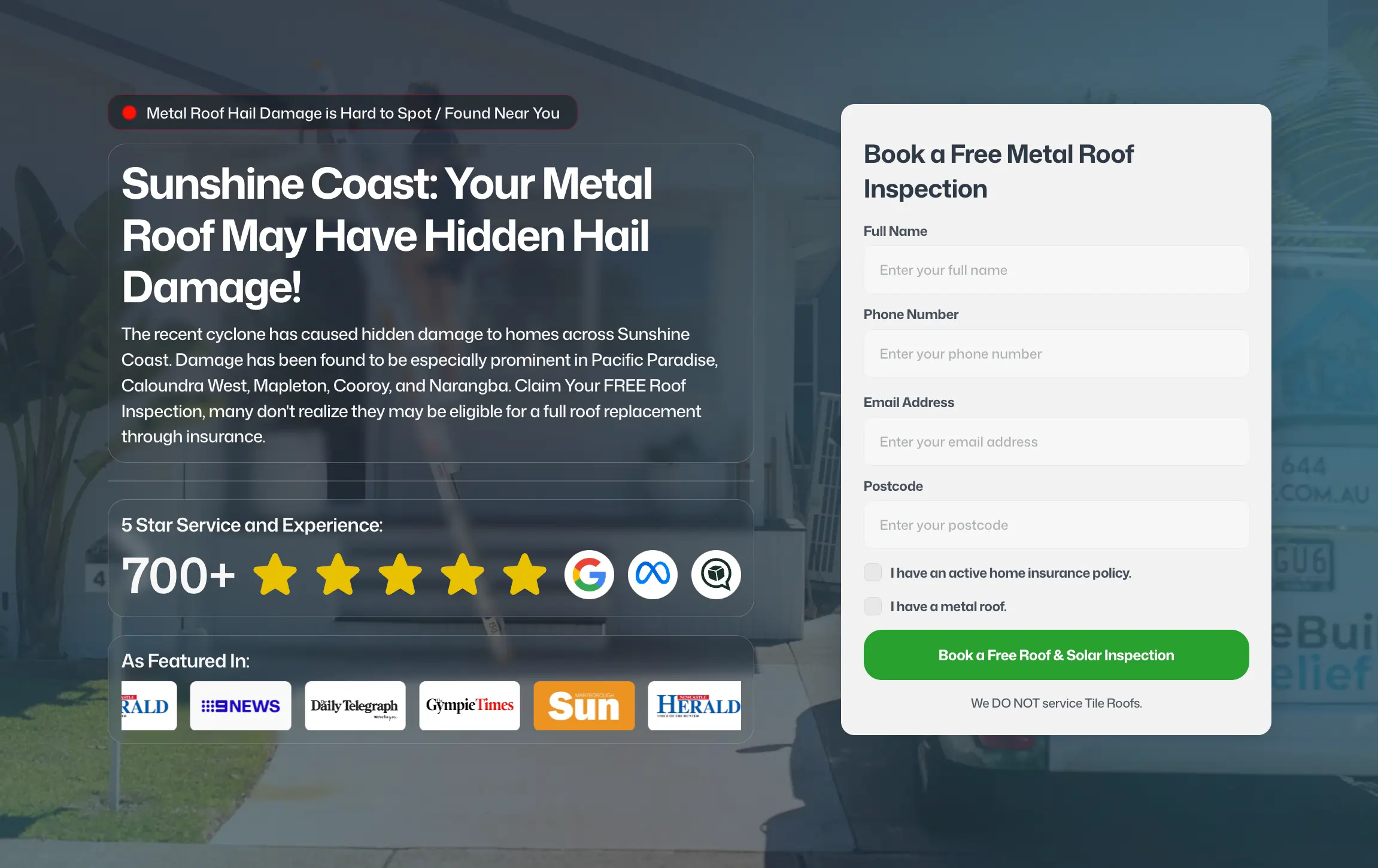
Intake (Public Form + API). Customers hit a form with: location, request type, photo uploads, contact info. The form uses Zod validation server-side with form error display. Photos upload directly to Supabase Storage with resize-on-upload (large formats cause bottlenecks). Once submitted, the request gets a unique reference ID immediately (psychology win — customers feel heard) and enters the routing queue.
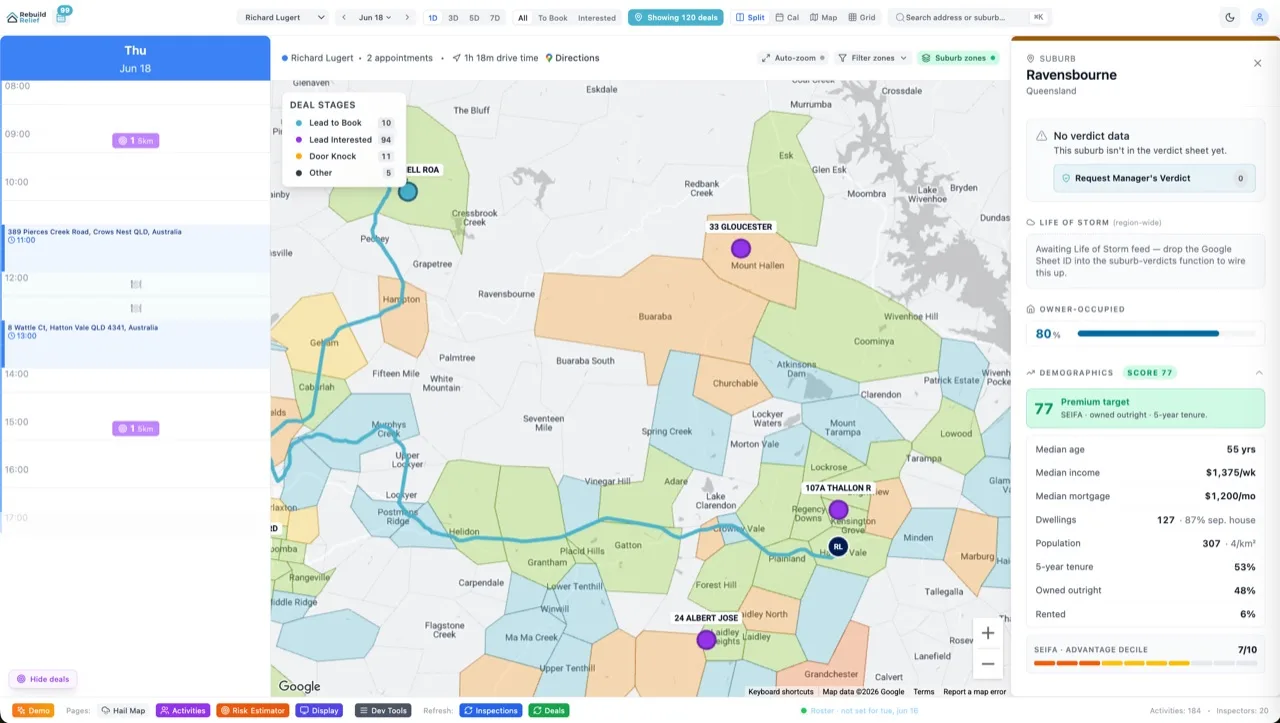
Geo-Routing Engine. This is where the complexity lives. Each request's location is geocoded to lat/long. The system queries all active dispatchers in the Supabase database, pulls their current location (updating when they clock in/out at a job), calculates distance to the request, and checks availability (dispatcher hasn't hit their daily cap, isn't already routed to a request in the same area). The routing algorithm is greedy-first (nearest dispatcher who's available) with a secondary constraint: no area should have more than 1 dispatcher overloaded on the same day (load balancing). If it's a surge day and every dispatcher is overloaded, the request gets put in a priority queue for manual routing by a coordinator. The whole routing happens in <500ms.
Dispatcher Portal (Route Cards + Photo Uploads). Dispatchers log in and see their daily route: a list of requests sorted by geography, with location, photos from the intake form, and an assessment form. They photograph the site, fill in severity (minor/moderate/major), cost estimate, and complete. All photos upload to S3-compatible storage with metadata (GPS, timestamp, dispatcher ID). Requests marked complete flip to "awaiting review" and trigger an automated notification to the team's review staff.
Customer Status Portal. Every customer gets an SMS with their request reference and a link to a public status page. They can check: request received, dispatcher assigned, in progress, awaiting approval, completed. Transparency reduces call volume by 40% — customers see the request is moving.
CRM Sync. When a request comes in, a function writes it to Supabase AND hits the CRM's API to create a record. As the request moves through the pipeline (routed → assessed → sent for review), the CRM updates. This keeps the system in sync without manual data entry. Dispatchers don't need to learn two tools — they work in the portal, and the CRM stays current.
Peak Load — Handling 800 Claims in 24 Hours
the client's biggest storm season event in 2025 was a severe hailstorm that hit 80,000+ properties across South-East Queensland. HailHero processed 847 claims in 36 hours. Here's how it didn't melt: Supabase's row-level security meant each assessor query only returned their own claims (no full-table scans). The intake form had client-side rate limiting (one submission per IP per minute). The routing function was async, so a spike in submissions didn't block the intake form from returning 200 OK immediately. Image processing happened in the background. The system peaked at 12 concurrent assessors uploading photos, and load stayed flat.
The surge also exposed the real-time leadership advantage: the team could watch claims come in on a coordinator dashboard (another Supabase query, filtered by status = "routed but not started"), reassign assessors on the fly if a storm was drifting, and manually override the algorithm if a postcode had become unreachable due to road damage. Without real-time data, they'd have been scheduling assessors blind.
What Services Operations Can Learn — Five Takeaways
1. Surge capacity beats steady-state optimization. Most SaaS is built for average load. A surge-dependent business's load varies 20x. The architecture had to be async-first: accept the request immediately, route it in the background, update status in real time. Synchronous design would have crashed.
2. Geolocation is the hidden data model. Route optimisation depends on knowing where dispatchers are right now, not where they were scheduled to be. Build a location table that updates when they check in/out at a job. That single signal enabled smarter routing and faster response times.
3. Sync with your existing CRM, don't replace it. The company already had established CRM workflows. Replacing it would have meant retraining the whole team. Instead, the portal feeds data INTO the CRM so the team can keep their habits and get better data.
4. Customer transparency is load reduction. A public status page and SMS updates don't seem like engineering work. They're force multiplication. Fewer inbound calls means fewer support staff needed during surge.
5. Multi-role design scales faster than single-role hacks. The system has three logins (customer, dispatcher, coordinator). Each role sees exactly what they need. Building three interfaces takes longer than one, but it runs cleaner, scales better, and has less cognitive load per user.
The Route Optimisation Overlap
The routing algorithm here is a smaller cousin of multi-stop route optimisation used in other field-service contexts. Both solve: given a list of locations and a team of mobile workers, assign each location to the nearest worker, balance load, and minimize travel time. The algorithm translates across different problems (intake dispatch, sales routing, service scheduling), which is why custom platform work compounds — each project informs the next.
Frequently Asked Questions
Can this system work for other types of intake/dispatch?
Yes. The architecture is generic enough to handle field services, emergency response, delivery routing, home services — anything where you need to intake requests, assign to field staff, track photos and evidence, and sync with a CRM. The specific business vertical is just the first use case.
How do you handle dispatcher unavailability?
Dispatchers log in and set availability (on duty, on break, end of day). The routing engine checks that status before assigning. If a dispatcher becomes unavailable mid-route, a coordinator can reassign remaining requests via the dashboard. The CRM record stays linked so nothing drops.
What about SLA tracking?
The system logs timestamps for every state transition: request received, routed, in progress, assessment complete, sent for review. SLAs are "dispatcher on site within 3 days of request." The system flags requests that breach the SLA so a coordinator can escalate.
Is the customer portal public-facing?
Yes. They get a unique URL with no login — just request reference + location verification (basic check). You don't require login because customers are busy and might forget credentials. The trade-off is simpler auth, which is fine for non-sensitive operations like "check my request status."
How much does custom dispatch tech like this cost?
The full build — forms, routing engine, dispatcher portal, customer portal, CRM sync, and RLS infrastructure — cost roughly $35,000. That included design, development, testing, and integration work. Ongoing hosting on Supabase costs ~$200/month (scales with data volume, not user count). See pricing packages for custom platform work in the $20–50K range. This type of project sits in the upper mid-range because of the routing complexity and CRM integration.
Why Supabase instead of Firebase or another backend-as-a-service?
Three reasons: Supabase has row-level security built in (each team member sees only their own requests), it's Postgres under the hood so complex queries are fast, and the pricing scales linearly with data, not concurrent users (during surge, you'd get killed on user-count pricing). Plus, the company's other internal tools already use Supabase, so you get schema consistency across the stack.
The Bottom Line — Custom Platform, Custom SLA
A bespoke system built for a specific company's ops model. It wouldn't ship in three months with off-the-shelf tools, and it would cost 3x as much to maintain. Custom platforms cost more upfront but own the problem in a way templates never will. The company can now handle a 20x load spike, keep dispatchers and customers in sync, and feed data back to their CRM without manual work. That's worth the build.