







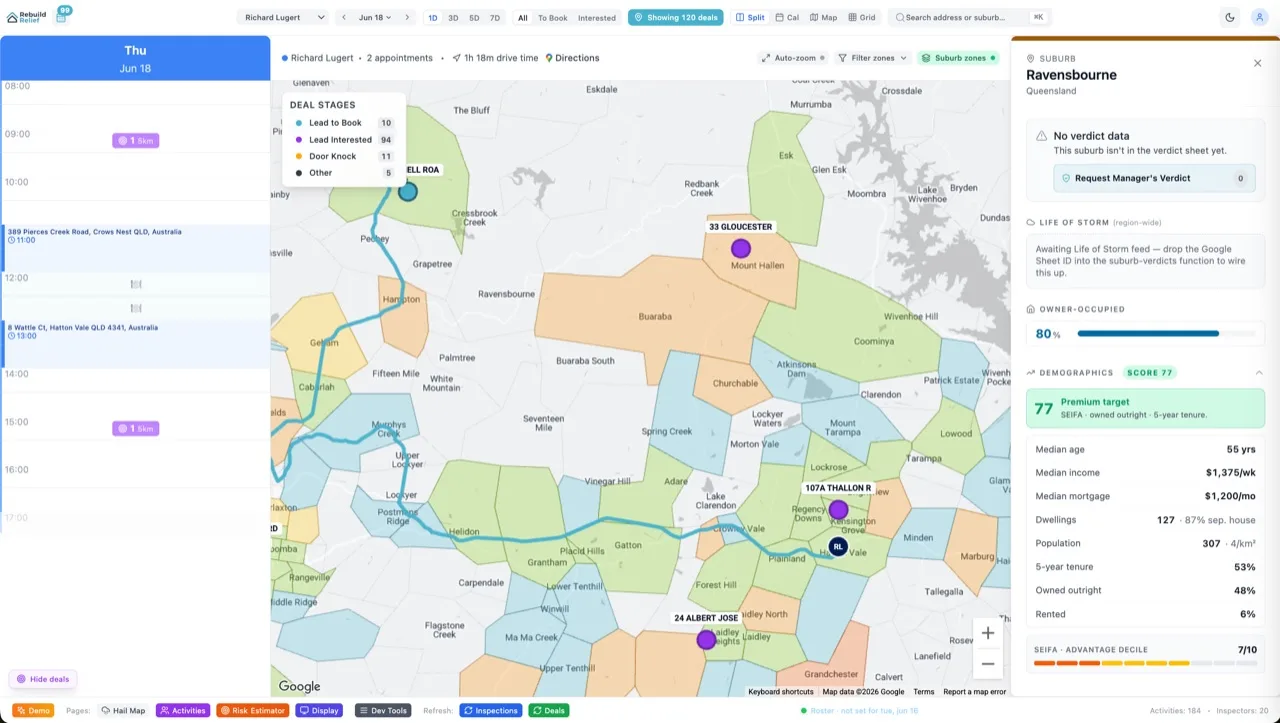

Internal ops dashboards decide whether your team drowns in spreadsheets or pilots a cockpit. Retool is a low-code platform: drag components, wire up data, ship in hours. A custom admin dashboard (Next.js + Supabase) takes days but costs $25/month, scales infinitely, and stays yours forever. Retool ships 10× faster; custom code wins at scale or if your brand matters. Aidxn has built both. Retool is perfect for one-off admin panels, rapid prototyping, and non-technical product managers shipping their first dashboard. Custom wins when your ops team grows past 10 people, when you need white-label customer portals, or when the per-user seat tax becomes unbearable. Here's the breakdown, the cost crossover, three real workflows, and the decision tree for your next ops tool.
What Is an Admin Dashboard?
An admin dashboard is internal software your team uses to manage operations: customer data, order status, approvals, reporting, analytics. It's not customer-facing (usually). Unlike a CMS (for marketers) or a SaaS product (for users), a dashboard is staff-only, data-heavy, and often mission-critical. A broken dashboard costs your ops team 10 lost hours per week. The trade-off: build fast vs. build right. Retool prioritizes speed (deploy in 2 hours). Custom prioritizes control and cost at scale (deploy in 2 days, then own it forever). The choice hinges on team size, whether you need branding, and how much per-seat cost you can stomach.
Retool: Low-Code Speed
Retool is a visual builder for internal tools. You drag SQL queries, form components, and tables onto a canvas. Connect a database (Postgres, MySQL, API), design the UI, and deploy. No writing HTML or CSS. Non-technical founders ship dashboards solo. Retool hosts everything (SAAS model): their servers, your data encrypted. Pricing: free tier (up to 5 users, limited features), Team ($10/editor/month, unlimited end users viewing but not editing), Business ($50/user/month, full white-label and custom SSO). So if you have 3 people building dashboards in Retool, that's $30/month (Team). If you have 50 ops staff viewing the dashboard, it's still $30/month (viewers don't cost extra on Team). The appeal: zero infrastructure, zero DevOps, ship in hours. The catch: you're renting the UI layer. Migrate away and you're rewriting the whole dashboard. You're also subject to Retool's pricing (could double tomorrow), rate limits, and feature roadmap. Retool is a lease, not a purchase.
Custom Admin Dashboard: Built to Own
A custom dashboard is a Next.js or Astro app connecting to Supabase (Postgres). You write the UI (React, shadcn/ui), you build the queries, you deploy to Vercel. The ops team sees a branded, fast, custom dashboard that looks like your company. Pricing: $25/month (Supabase Pro) + $0 (Vercel hosting for small dashboards, or $20/month for high traffic). Total: $25–45/month for unlimited users. That $25 never changes, even if your ops team grows to 100 people. The catch: you need engineering. A developer building a custom dashboard from scratch (CRUD, filtering, authentication, RLS) takes 3–5 days for a simple tool. You're responsible for upgrades, security patches, performance tuning. If the database breaks, it's on you. Custom is a long-term bet: front-load engineering time, then reap ownership forever.
Retool vs Custom: Head-to-Head
| Factor | Retool | Custom (Next + Supabase) |
|---|---|---|
| Time to Ship | 2–4 hours | 2–5 days |
| Monthly Cost (5 editors) | $10–50/mo (Team tier) | $25–45/mo |
| Monthly Cost (50 users) | $10–50/mo (viewers free) | $25–45/mo |
| Customization | Drag-and-drop (limited) | 100% (code) |
| Branding | Limited (not on free/team) | Full (your brand, your CSS) |
| Data Ownership | You own it (Retool hosts UI) | You own it (Supabase hosts DB) |
| Maintenance | Retool's problem | Your problem |
| Lock-in Risk | High (Retool-only syntax) | Low (standard React + Postgres) |
| Performance (100K rows) | Slow (UI rendering limits) | Fast (pagination, indexing) |
| Best For | Rapid prototyping, <10 users | Scale, branding, ownership |
Cost Crossover: When Custom Becomes Cheaper
Retool's pricing model is per-editor (person building the dashboard) plus per-viewer (people using it). Team tier ($10/editor) is cheap at first. But if you have 20 people editing Retool dashboards (custom queries, custom forms), that's $200/month. Add the ops staff viewing (unlimited on Team, but limited workflows), and you're capped. Business tier ($50/user/month) is for white-label + SSO, full customization. At 10 editors on Business, Retool is $500/month. Custom (Next + Supabase) is $25–45/month flat, forever. Crossover happens around 3–5 editors. If your team is 2–3 people building dashboards, Retool is cheaper and faster. If it's 5+ editors, custom wins on cost. If you need white-label (customer-facing portal), Business tier is $50/editor, and custom is still $25/month. Custom wins immediately. Real-world math: a 10-person ops team. Retool Team ($10/mo, ~5 editors building) = $50/month. Custom (Supabase + Next) = $30/month. But if you later need white-label, Retool jumps to $250/month (5 editors × $50). Custom stays $30/month, add $50 for a customer-facing instance = $80 total. Custom pays for itself in the first month.
Three Real Workflows
Workflow 1: Rebuild Relief — Insurance Claim Dashboard (Retool)
Rebuild Relief's assessors need a dashboard to log claim inspections: name, address, damage type, photos, estimated repair cost. Non-technical staff (5 people) build and update the dashboard. Retool is perfect: connect to Postgres, drag a form (name, address, select dropdowns for damage type), add a table view (search, filter by address or status), ship in 2 hours. No engineers needed. Cost: $10/month (Retool Team). The ops team (40 assessors viewing the dashboard) costs nothing extra. If Rebuild Relief later needs white-label (let homeowners check claim status), they'd migrate to Retool Business ($50 × 5 editors = $250/mo) or custom ($80/mo including white-label). For now, Retool is the obvious choice: speed, non-technical, cheap.
Workflow 2: TradePilot — Portfolio Dashboard (Custom Next + Supabase)
TradePilot is a day-trading SaaS with 50 paying users. The internal ops dashboard tracks accounts (broker links, balance, performance), positions (stock, entry price, exit rules), and trades (entry/exit, P&L). Retool's drag-and-drop would hit limits: complex charts (candlesticks, P&L curves), real-time data syncs (position updates as the market moves), row-level security (trader A sees only trader A's accounts). Custom Next + Supabase won: React charts (Recharts), websocket subscriptions for real-time, Postgres RLS for data isolation. Engineering cost upfront (3 days). Maintenance cost (1 engineer part-time). But the dashboard is fast, branded (TradePilot blue/white, custom logo), and scales to 1000 users without a per-user fee. Cost: $30/month (Supabase Pro). Retool would cost $50/month Business tier for white-label, plus hitting UI ceiling at 50K positions. Verdict: custom wins.
Workflow 3: SaaS Ops — Multi-Tenant Admin Panel (Custom + Aidxn)
A SaaS founder needs a customer-facing admin portal (white-label): customers log in and manage their own data (subscription, API keys, usage). Retool Business ($50/editor × 3 editors = $150/mo) for white-label. Custom Next + Supabase: $80/month. But custom also wins on performance (Retool viewers can't custom-style, custom HTML/CSS does) and lock-in (no Retool syntax). If the SaaS scales to 100 paying customers (each customer is a user accessing the portal), Retool Team makes no distinction; it's still $30 for unlimited end-users. Custom (Supabase) is also flat: $25–80/mo. Both scale infinitely. But custom is portable: if a bigger platform (Stripe) launches admin portals as a feature, you can port custom code to them easily. Retool code is trapped inside Retool. For SaaS, custom is always the long-term bet.
Building a Custom Dashboard in 1 Day
Start with a Next.js template + Supabase. Create a Postgres table: CREATE TABLE orders (id BIGINT PRIMARY KEY, customer text, amount int, status text, created_at timestamp); Next.js page with TypeScript + React Hook Form: fetch orders on mount, add a form to create orders, display in a shadcn table, search by customer. RLS policy: only admins see all orders (WHERE auth.jwt() ->> 'role' = 'admin'). Deploy to Vercel. Env vars: NEXT_PUBLIC_SUPABASE_URL, SUPABASE_SERVICE_KEY. That's a functional, branded admin dashboard in a morning. Add charts (Recharts), real-time (Supabase subscriptions), and you're at 1 day. Retool ships in 2–4 hours for basic CRUD; custom takes a day for polished UX. The time delta shrinks if you use templates (e.g., Admin.dev, free Next + Supabase starter kits). For teams with engineering capacity, custom is the rational choice past 5 users or if branding matters.
Migration Path: Retool → Custom
If you start with Retool and later need to migrate to custom, the path is clear. Export data from Retool (CSV, API) → import to Postgres. Take screenshots of your Retool UI (form layout, table columns, filters). Rebuild the UI in Next.js + shadcn (1–2 days of engineering). Test against the old Retool dashboard side-by-side. Deploy and switch the team over. Retool's low-code nature means you're not losing complex code (because there is none), just the UI layout. For small dashboards (<10 tables, <100K rows), the migration is painless. For sprawling Retool apps (50+ tables, hundreds of queries), it's a 1–2 week effort. Plan migrations early: don't let Retool become your de facto database for 3+ years. Migrations are easier sooner than later.
Six FAQs
Can Retool handle real-time data updates?
Partially. Retool supports polling (refresh every X seconds) and REST API streaming. Native websocket support is limited. For mission-critical dashboards where instant updates matter (trading, live status), custom React + Supabase websockets is better.
Is Retool secure?
Yes, for internal tools. Retool encrypts data in transit and at rest. SOC 2 compliant. But you're trusting Retool with your database credentials (Retool stores them encrypted). For highly sensitive data (healthcare, finance), some teams prefer custom (you control the connection).
Can Retool query multiple databases?
Yes. Connect Postgres, MySQL, MongoDB, REST APIs, GraphQL. Build a dashboard pulling data from 3 sources. Custom code also does this, but requires more wiring (each database client, each query).
Does Retool support mobile?
Yes, responsive design. Retool dashboards reflow on mobile. But UX is better on desktop (drag-and-drop logic flows). Custom React + Tailwind gives fine-grained mobile control.
What if Retool changes pricing?
Retool has raised prices before (Team tier used to be cheaper). If pricing becomes unbearable, your only option is to migrate code. Lock-in risk is real. Custom avoids this: you're on Supabase (which has stable pricing) + standard React (no proprietary syntax).
Can I use Retool + Custom together?
Yes. Retool for rapid prototyping one-off dashboards (<10 users). Custom for permanent ops tools (20+ users, branding, scale). Hybrid approach is sensible for large organizations.
The Bottom Line
Use Retool for rapid internal dashboards, non-technical teams, and one-off admin panels. Retool ships in hours and costs $10–50/month for small teams. Use custom (Next + Supabase) when your ops team grows past 10 people, when you need white-label customer portals, or when ownership matters. Custom costs $25–45/month flat (scales to 1000 users), is fully branded, and avoids lock-in. For Aidxn projects: Retool for internal prototypes or non-technical clients; custom for anything customer-facing, anything at scale, or anything where the brand is part of the product. The decision is usually clear in the first conversation: if the team is <5 non-technical people, Retool. If engineering is involved or the dashboard is customer-facing, custom. If unsure, prototype in Retool (2 hours), then commit to custom if it matters. For help architecting internal tools or connecting Supabase to your ops stack, see Aidxn Design services or read more on SaaS tooling at building internal infrastructure.