







Internal tools live or die on cost and ergonomics. Your team needs to capture data, edit workflows, and collaborate without paying per-seat tax. Three platforms own this space: Notion (docs + lightweight databases), Airtable (visual database SaaS with a punishing per-seat fee), and Supabase (Postgres + JavaScript SDK, deploy your own UI). Aidxn has built internal tools on all three. Notion is excellent for wikis and procedural docs; it's not a database. Airtable feels free until you add users — then $30/seat per month becomes a grudge. Supabase + a lean Next.js or Astro UI costs $25/month all-in (Postgres + compute), scales to 50 users, and you own the data outright. Here's the breakdown, the comparison, three real workflows, and the decision tree for your next internal tool.
What Are Internal Tools?
Internal tools are software your team uses to run operations: customer databases, order status dashboards, lead trackers, inventory logs, approval workflows. They're not customer-facing; they're for staff. Unlike a headless CMS (for marketers to publish content), internal tools are data-heavy and team-wide. Everyone who touches the tool pays a cost — either per-seat licensing or infrastructure overhead. The trade-off is real: Notion and Airtable abstract away infrastructure (no databases to manage), but you pay per user. Supabase requires you to build a UI (or use a pre-built one), but the per-user cost is zero (only your database costs). The decision hinges on: team size (2 users vs 20), data complexity (simple table vs relational), and in-house engineering capacity (none vs full-stack team).
The Three Platforms Compared
Notion: The Wiki with Database Bolts-On
Notion is a document platform (wiki, notes, procedural docs) that added database features in 2021. Databases in Notion are views over blocks: you create a table, link related records, and filter. For lightweight workflows (contact rolodex, simple task board), Notion works. Pricing is per-workspace, not per-seat: $10/month (Plus) or $20/month (Business). That's $10–20 for unlimited users. The appeal is obvious: invite your whole team, no per-head cost. The reality: Notion is not a database system. It's a document store with table rendering. For workflows requiring relational data (e.g., "link this customer to all their orders"), Notion hits a ceiling fast. Buttons can trigger webhooks (e.g., "create order in Stripe"), but automation is rough. APIs exist but are limited to read-heavy workflows. The killer use case: company wiki, onboarding checklist, procedural documentation. Everything else is a compromise. Notion databases are also slow above 5K records (full-table filters choke). For non-technical teams, Notion feels frictionless because it's all UI; there's nothing to deploy. For ops-heavy workflows, Notion is toy software.
Airtable: The Spreadsheet That Charges Per Head
Airtable is a visual database platform (think Excel on steroids). You define tables, link records, add automations, and filter views. The admin UI is polished; non-technical users can define schemas without code. Pricing: free tier is limited (1K records), Team plan is $20/month for unlimited records, BUT each additional user is $30/month. So a 10-person team costs 20 + (9 × 30) = $290/month. Scale to 50 users and you're spending $1,520/month. Airtable gets expensive. The features are solid: linked records (relational joins), automations (when X, do Y), integrations (Slack, Zapier), and REST API. Non-technical users love Airtable because the schema UI is intuitive. For 2–3 person teams with light data work, Airtable is fine. For 10+ person teams, the cost becomes unbearable — you start asking "why are we not building this ourselves?" Airtable's ecosystem is mature (lots of templates, integrations), but you're trapped by the per-seat tax. The platform is purpose-built for teams that don't have engineering. If you do, Airtable is a lease, not a purchase.
Supabase: The Postgres Backend + You Build the UI
Supabase is a Postgres database (managed, encrypted, backed up) with JavaScript SDKs, real-time sync, and a web UI. You don't build the database layer; Supabase does. You build the UI: a Next.js app, Astro, SvelteKit, anything with JavaScript. Pricing: free tier is 500MB database + 2GB bandwidth (for tiny teams). Pro is $25/month (8GB database, 50GB bandwidth, email support). That's $25/month for unlimited users. Your team of 50 costs $25/month, not $1,520. The trade-off: you're building a UI (or finding a pre-built template). That requires engineering. Supabase ships a web console (for data CRUD) and auth (row-level security so users see their data, not everyone's). You can deploy a Next.js admin dashboard in a day if you know React. If you don't, Supabase is harder than Airtable. For teams with engineering chops, Supabase is the obvious winner: cost scales with data, not headcount. For teams without engineers, Airtable or Notion (for simpler workflows) is more pragmatic. Real-time is built-in (Supabase websockets alert users when data changes). APIs are automatic (REST and GraphQL). Row-level security (RLS) means fine-grained access control without building permissions code yourself. The philosophy: Supabase is infrastructure (like AWS), not a tool. You own the UI, the data, the workflows. You're responsible for building it.
Comparison Table
| Feature | Notion | Airtable | Supabase |
|---|---|---|---|
| Pricing (10 users) | $10–20/mo | $290/mo (ouch) | $25/mo |
| Data Complexity | Lightweight (slow above 5K) | Moderate (100K+ possible) | Heavy (billions of rows) |
| Real-Time Sync | No (polling only) | No (automations async) | Yes (websockets) |
| UI Control | Fixed (no customization) | Limited (layouts, filters) | 100% (you build it) |
| Automations | Webhooks (rough) | Built-in + Zapier | Custom (Edge Functions) |
| Best For | Company wiki, docs | Non-tech teams (small) | Eng teams, data ops |
| Data Ownership | Notion Cloud (locked in) | Airtable Cloud (locked in) | Your Postgres (portable) |
Three Decision Branches
Branch 1: Company Wiki + Light Documentation
Notion. Use Notion for procedural docs, onboarding, team pages, and light task tracking. Invite your whole team for $10/month (Plus plan). Notion's strength is collaborative editing (multiple people writing procedurally simultaneously) and rich formatting (embeds, images, database links). The ceiling: don't use Notion for relational data (e.g., customer orders), don't expect fast queries above 5K rows, and don't try to automate complex workflows. Notion is a document platform dressed up as a database. It's perfect for what it is; just don't expect more.
Branch 2: Non-Technical Team + Simple Data + Small Headcount
Airtable (for now). A small team (2–5 people) tracking contacts, leads, or inventory in Airtable is sensible. The UI is intuitive; no engineers required. Automations (when a new lead arrives, email the sales team) are point-and-click. Integrations (Slack, Zapier) are pre-built. For non-technical teams, Airtable is the path of least resistance. The catch: the moment you scale to 10+ users, the per-seat cost becomes untenable. At that point, you either (a) cap the number of active users (bad for team morale), or (b) bite the bullet and migrate to Supabase. Plan the migration upfront. Don't let Airtable become your de facto database for 3+ years.
Branch 3: Engineering Team + Ownership + Scale
Supabase. If you have engineers and you care about owning your data, Supabase is the only rational choice. $25/month for 10 users. $25/month for 100 users. You build a Next.js admin dashboard (1–2 days) and deploy to Vercel. Row-level security means Alice sees Alice's data, Bob sees Bob's. Real-time websockets mean the dashboard updates as data changes. Custom automations (Postgres functions, Edge Functions) are code, not point-and-click, but they're powerful. For SaaS and teams comfortable writing code, Supabase is the winner. For pure ops teams (no engineering), Airtable is more pragmatic (but budget accordingly).
Three Real Workflows
Workflow 1: Rebuild Relief — Customer Intake (Notion + Airtable Hybrid)
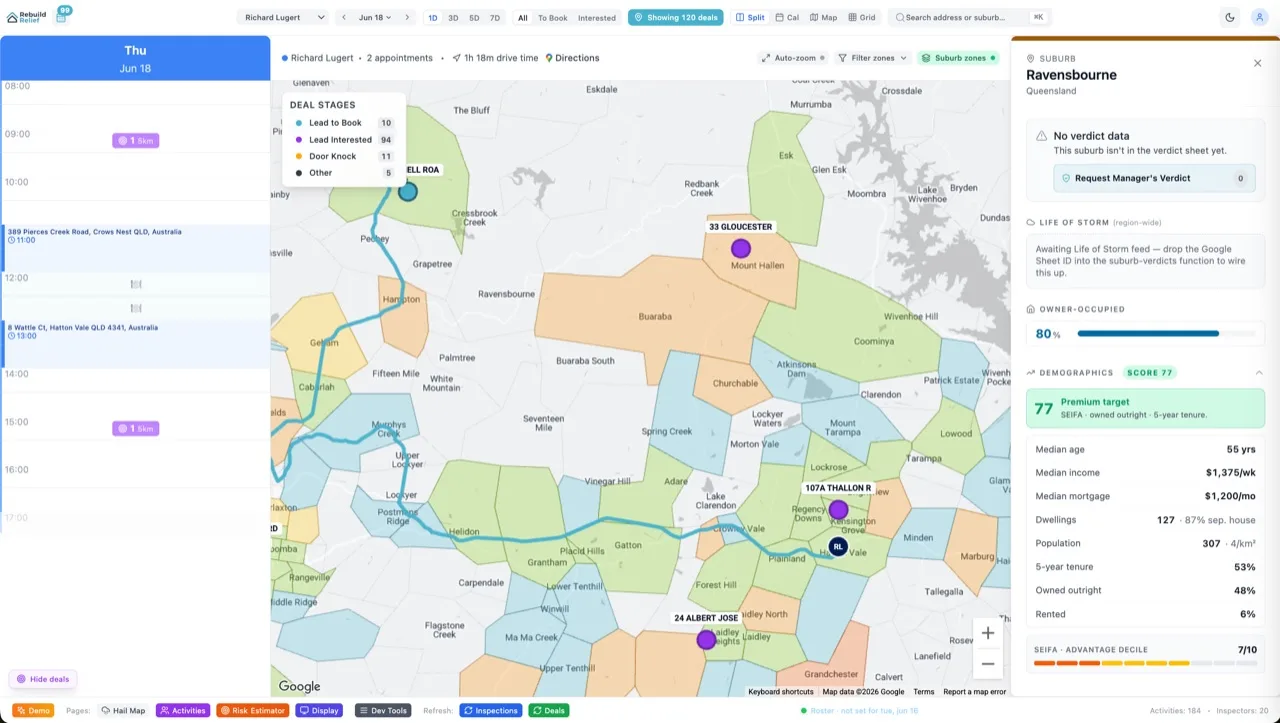
Rebuild Relief (insurance claim assessments) uses Notion for process documentation (step-by-step claim assessment, photo requirements) and Airtable for lightweight customer tracking (name, claim number, assessment status). Non-technical staff uses both. Notion is the source-of-truth for "how do we assess hail damage?"; Airtable is the "who are we assessing today?" dashboard. Airtable automations send Slack notifications when a claim is submitted. No Supabase needed because the team is non-technical and data volume is < 5K claims/month. Cost: $10 (Notion) + $50 (Airtable, small team) = $60/month. If claims scaled to 50/month and the team grew, a Supabase migration would be next. For now, this hybrid is pragmatic.
Workflow 2: Aidxn Design — Project Tracker (Supabase)
Aidxn Design uses Supabase for internal project management. Schema: Projects (name, client, budget, deadline), Tasks (assigned to, status, due), and Team (email, role). A Next.js dashboard displays projects in a Kanban (todo, in-progress, done), with task assignment and comments. Real-time sync means when Aiden updates a task status, the team sees it instantly. Row-level security: team members see their tasks, managers see all. Postgres functions auto-calculate project margin (budget - actual hours). Cost: $25/month. At scale (100 team members, 10K projects), cost is still $25/month (plus maybe $50 for compute/bandwidth). For a 5-person team, this setup is overkill (Notion would work), but Aidxn has the engineering chops and cares about ownership. Verdict: Supabase is worth it here.
Workflow 3: Fortune 500 Sales Ops (Supabase at Scale)
A 100-person sales team tracking $50M in pipeline cannot use Airtable (cost would be $3,000/month). They deploy Supabase (Postgres) + a custom Next.js dashboard. Schema: Accounts (customer company), Opportunities (deals), Contact (people), and Activities (calls, emails). RLS ensures reps see only their accounts. A sales manager dashboard rolls up by region. Real-time alerts notify the team when a deal stages up. Postgres full-text search lets reps find customers by name instantly. Machine learning (Postgres + Python edge functions) scores leads by propensity to close. Cost: $300/month (Supabase Pro + extra database capacity). Compare to Salesforce ($250/seat, 100 people = $25K/month). Supabase is 100× cheaper and you own the data. For enterprise, Supabase is a no-brainer.
Building a Supabase Internal Tool in 2 Hours
If you choose Supabase, here's the starter template. Create a Postgres table (team contacts). Build a Next.js form to add/edit. Deploy to Vercel. Schema: CREATE TABLE contacts (id bigint PRIMARY KEY, name text, email text, role text, created_at timestamp); Next.js page with React Hook Form + Supabase client: fetch contacts on mount, submit new entries via insert(), display in a table, delete via update(). Real-time: add Supabase websockets listener (onInsert/onUpdate) to re-fetch. RLS policy: users see only their own entries (WHERE contact.user_id = auth.uid()). Deploy to Vercel: env vars for SUPABASE_URL and SUPABASE_KEY, done. That's a functional internal tool in a day. Templates and starter kits are available at Aidxn Design or open-source tools like AdminJS (auto-generates admin UI from Postgres schema). For teams needing just CRUD, AdminJS saves days.
Six FAQs
Can I migrate from Airtable to Supabase?
Yes. Export Airtable as CSV, import to Postgres, build a Next.js UI that mirrors the Airtable layout (table, filters, sorting). Takes a weekend for < 100K rows. For 1M+ rows, plan a week (validation, performance tuning).
Is Notion slow above 5K records?
Yes. Filtering a 10K-record Notion database is noticeably slow (2–5 seconds). Airtable and Supabase handle this in milliseconds. Notion is optimized for documents, not queries.
Can Airtable do row-level security?
No, not natively. Airtable shows all records to all users (unless you restrict view access). For data isolation (rep A can't see rep B's deals), you need Supabase RLS or a custom app.
Does Supabase require engineers?
For a basic CRUD app, no. Use a no-code builder like Budibase (open source, deploys on Supabase) or a template like AdminJS. For custom workflows (automations, multi-table logic), you need a developer.
What's the data limit on Supabase Pro?
8GB included; you can buy more. At Postgres rates (~$0.20/GB/month), scaling data is cheap. For comparison, Airtable includes unlimited records but charges per seat, so costs scale with humans, not data.
Can I use Supabase + Airtable together?
Yes. Store operational data (customer records, transactions) in Supabase. Use Airtable for lightweight team collaboration (planning, checklists). Sync via API if needed. Hybrid approach is common for teams straddling both worlds.
The Bottom Line
Use Notion for wikis and procedural docs. Use Airtable for non-technical teams with < 5 active users (accept the per-seat cost as a trade-off for usability). Use Supabase for anything else: data ops, multi-user systems, teams with engineering, or any tool where you care about owning your data. For Aidxn projects: internal tools are Supabase (cost, control, real-time), wikis are Notion (collab, formatting, simplicity). Airtable is the middle ground for non-technical teams but becomes a grudge at scale. If your team is planning an internal tool and headcount is more than 5, start with Supabase. If you're non-technical and headcount is < 5, Airtable is pragmatic; just plan a migration strategy for later. For SaaS and high-growth teams, Supabase is the only rational choice. Learn Postgres. Deploy to Supabase. Own your data. For help designing internal tools or connecting Supabase to your ops workflow, see Aidxn Design services or read more on SaaS infrastructure at building backend systems.